Published | Last updated
A PRISMA flow chart (the PRISMA 2020 flow diagram) records how many records a systematic review found, screened, excluded and included, and why. Every box has to reconcile with the one before it. This guide gives you the template to pick, the five arithmetic rules every diagram must satisfy, and a worked example: a published review whose numbers add up in every box.
In Simple Words
Pick one of four PRISMA 2020 templates. Fill each box with a count. Check that each count equals the box before it minus what you removed. Make the same numbers appear in your abstract, Methods and Results.
Which PRISMA 2020 flow chart template do you need?
PRISMA 2020 (Page et al. 2021) provides four templates. Choose by two questions: is this a new review or an update, and did you search only databases and registers or also other sources such as websites, organisations and citation searching?
| Your review | Template | What it adds |
|---|---|---|
| New review, databases and registers only | Template 1 | Identification, screening and inclusion from databases and registers |
| New review, plus other search methods | Template 2 | A second column for websites, organisations and citation searching |
| Updated review, databases and registers only | Template 3 | Previous-version studies carried into the totals |
| Updated review, plus other search methods | Template 4 | Both of the above |
The official templates are on the PRISMA website. If you prefer to enter numbers and export a figure, the PRISMA2020 Shiny app (Haddaway et al. 2022) and Editverse Flowchart Pro (linked below) both do this.
The five rules every PRISMA flow chart must satisfy
A flow chart is arithmetic. Reviewers and editors check it with a calculator before they read your Methods. These five rules catch almost every error.
| Rule | Arithmetic | Where it is checked |
|---|---|---|
| 1. Screened | Records identified – records removed before screening = records screened | Identification box to Screening box |
| 2. Sought | Records screened – records excluded = reports sought for retrieval | Title and abstract stage |
| 3. Assessed | Reports sought – reports not retrieved = reports assessed for eligibility | Retrieval stage |
| 4. Included | Reports assessed – reports excluded (with reasons) = studies included. The reasons must sum to the excluded count | Full-text stage |
| 5. Sources | Per-database counts sum to total identified; per-database duplicates sum to total duplicates removed | Identification box |
Then check the text. The numbers in the diagram must be identical to those in your abstract, Methods and Results. A mismatch between the figure and the prose is one of the most common problems editors find.
Worked example: a published review where every box reconciles
The example is Lidströmer et al. (2024), a systematic review and meta-analysis published in Nature Communications and registered on PROSPERO (CRD42022342597). The authors searched seven databases plus registers, screened with two reviewers and a third to arbitrate, and used Rayyan for screening. Their flow diagram is reproduced below under the article’s CC BY 4.0 licence.
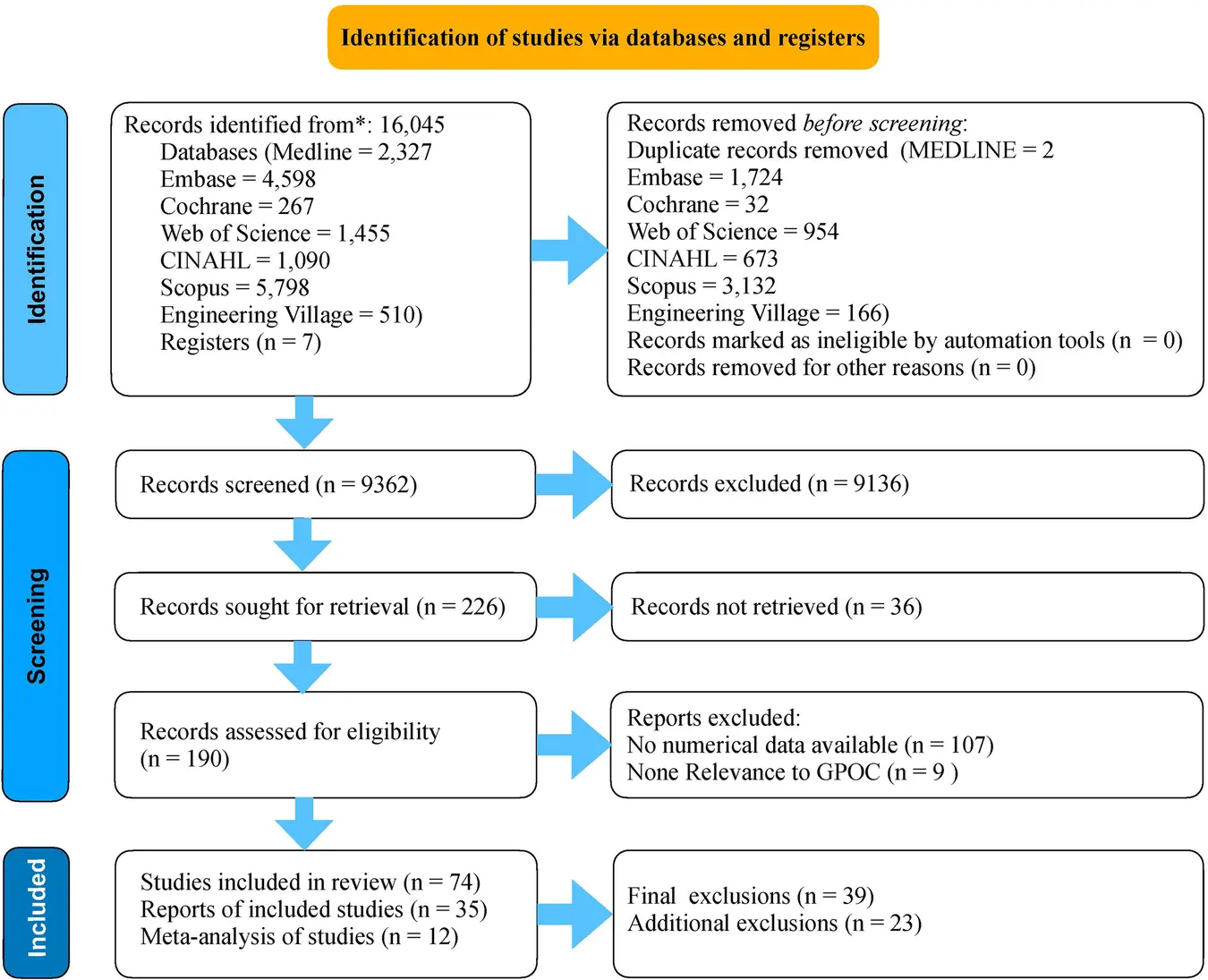
Now apply the five rules to the numbers in that figure. Every row reconciles. All sums below were computed independently in R and Python.
| Rule | Numbers from the figure | Result |
|---|---|---|
| 5. Sources (identified) | 2,327 + 4,598 + 267 + 1,455 + 1,090 + 5,798 + 510 = 16,045 from the seven databases. The figure also lists 7 register records | The databases match the 16,045 total; the 7 register records are not in it (see below) |
| 5. Sources (duplicates) | 2 + 1,724 + 32 + 954 + 673 + 3,132 + 166 = 6,683 duplicates; 0 by automation tools; 0 for other reasons | 6,683 removed |
| 1. Screened | 16,045 – 6,683 = 9,362 | Matches 9,362 screened |
| 2. Sought | 9,362 – 9,136 excluded = 226 | Matches 226 sought |
| 3. Assessed | 226 – 36 not retrieved = 190 | Matches 190 assessed |
| 4. Included | 190 – 107 (no numerical data) – 9 (no relevance) = 74 | Matches 74 studies; reasons sum to 116 |
| Final boxes | The last box lists 74 studies, 35 reports and 12 in the meta-analysis. The side box lists 39 final and 23 additional exclusions. 74 – 39 = 35 and 35 – 23 = 12 | Reconciles, but the side-box labels do not say which count each exclusion applies to |
How to read it. Only 226 of 9,362 screened records (2.4%) reached full-text retrieval, and 190 were assessed. That is normal for a broad search: most records fall at the title and abstract stage. What makes the diagram credible is that a reader can rebuild every box from the one before it. Note also that the duplicates are broken down by database, which lets another team reproduce the deduplication.
What a careful reader would still query. Two details in this published figure show how small labelling choices cause questions. First, the 16,045 total equals the seven databases alone, so the 7 register records sit outside the total and outside the 9,362 screened. A reader cannot tell whether they were screened. State where registry records go: add them to the identified total, or say they were handled separately. Second, the final side box gives two exclusion counts without saying which stage each belongs to. Label every exclusion with the count it reduces.

Need the diagram built for you? Send your screening counts and we return a PRISMA 2020 flow diagram on the correct template, with your numbers checked at every stage.
Box-by-box: what goes in each PRISMA 2020 box
Identification. Enter records identified from each database and register. List the count per source where you can. Then record what you removed before screening, in three separate lines: duplicates, records marked ineligible by automation tools, and records removed for other reasons. Put a 0 where none apply, as the example does.
Screening. Records screened and records excluded take one count each, with no reasons. Next, reports sought for retrieval and reports not retrieved. Then reports assessed for eligibility.
Reports excluded, with reasons. Give a specific reason for each group of excluded full texts and make the reason counts sum to the excluded total. In the example, 107 reports had no numerical data and 9 had no relevance to the review question. Use reasons tied to your pre-specified eligibility criteria, not general phrases.
Included. State new studies included and the reports that describe them. A study can have several reports, so the two numbers can differ. Updated reviews add the studies carried over from the previous version.
Records versus reports. A record is a title or abstract entry in a database. A report is a document that describes a study: a journal article, preprint, conference abstract, registry entry or clinical study report. Counting them separately is the main structural change from the 2009 diagram.
How to build the diagram from a screening spreadsheet
Draw the figure last. Build the numbers first, in a tracking sheet with one row per record, so every box is a filter count rather than a tally kept by hand.
- Export and label. Give each record a unique ID and a source column (MEDLINE, Embase, register name). The per-source counts in the identification box are a count of this column.
- Deduplicate in one place. Mark duplicates with a flag and the source they came from, rather than deleting rows. The flag gives you the per-database duplicate counts and keeps the removal auditable.
- Add a stage column. Use fixed values: duplicate, excluded at title and abstract, not retrieved, excluded at full text, included. Each row ends in exactly one stage, so the stage counts must add to the total identified.
- Add a reason column for full-text exclusions. Use one reason per report, drawn from a list written in your protocol, and count them.
- Run the five rules as formulas. Put the five subtractions from the rules table beside your counts. Any cell that does not equal the next box is an error to fix before drawing.
- Draw from the counts. Enter the numbers into an official template or the PRISMA2020 app, then compare the figure with the sheet once more.
Screening software such as Rayyan, used in the worked example, exports these decisions, but check its counts against your own sheet: tools can count records and reports differently. If you used a machine-learning classifier or other automation to remove records, report the tool and the number it removed in the dedicated box (item 8).
Where else the numbers must appear in your manuscript
The flow diagram is one part of PRISMA 2020 item 16a, which asks you to describe the results of the search and selection process, from records identified to studies included, ideally with a flow diagram. Item 16b asks you to cite studies that might appear to meet the inclusion criteria but were excluded, and to explain why. Item 8 asks you to report how many reviewers screened each record and report, whether they worked independently, and any automation tools. Item 7 covers the search strategy. These items are set out with examples in the PRISMA 2020 explanation and elaboration paper (Page et al. 2021).
Registering your protocol first makes every number defensible. See our guide to PROSPERO registration, and for matching reporting guidelines to each chapter of a thesis, Medical Dissertation Reporting Guidelines.
Five PRISMA flow chart mistakes that draw reviewer comments
- Totals that do not reconcile. Apply the five rules to your own spreadsheet before you draw anything.
- Exclusion reasons that do not sum. The reason counts must equal the number of reports excluded at full-text stage.
- Mixing records and reports. Label each box with what it counts: “records” for database entries, “reports” for documents.
- Using the 2009 diagram. If you followed PRISMA 2020, use one of the four 2020 templates, including the three removal lines before screening.
- Picking the wrong template for an update. An updated review uses Template 3 or 4, not Template 1 or 2.
Free Research Tools for Your PRISMA Flow Chart
Free Research Tools from Editverse
- GraphPro: build publication-ready charts, 25 types, with built-in t-test, ANOVA, correlation, and chi-square p-values. Free, no signup.
- StatPro: free statistical calculators and a test-selector tool covering group comparisons, categorical outcomes, time-to-event analysis, and diagnostic accuracy.
- Flowchart Pro: generate PRISMA 2020, PRISMA-ScR, CONSORT, STROBE, STARD, MOOSE, and ARRIVE flow diagrams directly in your browser.
Professional Support for a PRISMA-Compliant Systematic Review
Each package below produces the documents a reviewer checks first: a documented search with deduplication counts, a registered protocol, and a flow diagram that reconciles. Subject-matter experts and information specialists run the work to PRISMA 2020.
Search
$400
Strategy across 5+ databases, MeSH and Emtree terms, deduplication and PRISMA-compliant search documentation. 1-2 weeks.
Protocol
$500
PROSPERO-ready protocol with eligibility criteria, search strategy for 3 databases, screening protocol and extraction form. 2-3 weeks.
Full review
$1800
Systematic review plus meta-analysis for up to 15 studies, with PRISMA flow diagram and full PRISMA 2020 checklist adherence. 10-14 weeks from protocol approval.
Writing up the review? See manuscript writing services. Editverse practice aligns with COPE, ICMJE and GPP 2022.
Conclusion
A PRISMA flow chart earns trust through arithmetic: five rules, one template, and numbers that match the text. The worked example shows what that looks like in a real published review, with 16,045 records narrowed to 74 studies and every box reconcilable from the one before it. Pick your template, apply the rules to your own counts, and check the figure against your abstract before submission.
Frequently Asked Questions
What is a PRISMA flow chart?
A PRISMA flow chart, formally the PRISMA 2020 flow diagram, shows how many records a systematic review identified, screened, excluded and included, with reasons for full-text exclusions. It is reported under item 16a of the PRISMA 2020 checklist.
What is the difference between PRISMA 2009 and PRISMA 2020 flow diagrams?
PRISMA 2020 separates records (database entries) from reports (documents), adds boxes for records removed before screening by duplicate, automation tool or other reason, and provides four templates: new or updated reviews, each with or without other search methods. The 2009 diagram has one template and no automation or reports distinction.
How many items are in the PRISMA 2020 checklist?
The PRISMA 2020 checklist has 27 items. The flow diagram supports item 16a, and item 16b asks you to cite studies that seemed eligible but were excluded, with reasons.
Do I need reasons for records excluded at title and abstract screening?
No. PRISMA 2020 asks for reasons only for reports excluded at full-text assessment. The title-and-abstract exclusion box carries a single count.
What is the difference between a record and a report?
A record is a title or abstract entry in a database or register. A report is a document that describes a study, such as a journal article, preprint, conference abstract or registry entry. One study can have several reports, so the final box lists studies and reports separately.
Which template do I use for an updated systematic review?
Use Template 3 if the update searched only databases and registers, and Template 4 if it also used websites, organisations or citation searching. The updated-review templates add boxes for studies carried over from the previous version.
Is dual screening required by PRISMA 2020?
No. Item 8 asks you to report how many reviewers screened each record and report, whether they worked independently, and any automation tools used. Independent dual screening is common practice but is not mandated by the statement.
What if I cannot retrieve some full texts?
Report them in the box for reports not retrieved, with the count. In the worked example, 36 of 226 reports could not be retrieved, leaving 190 assessed for eligibility.
Can I use the official template or a generator?
Yes. The PRISMA website provides the four templates, and the PRISMA2020 Shiny app produces a compliant diagram from your numbers. Flowchart Pro by Editverse also builds PRISMA 2020 diagrams in the browser for free.
References
- Page MJ, McKenzie JE, Bossuyt PM, et al. The PRISMA 2020 statement: an updated guideline for reporting systematic reviews. BMJ. 2021;372:n71. doi:10.1136/bmj.n71
- Page MJ, Moher D, Bossuyt PM, et al. PRISMA 2020 explanation and elaboration: updated guidance and exemplars for reporting systematic reviews. BMJ. 2021;372:n160. doi:10.1136/bmj.n160
- Haddaway NR, Page MJ, Pritchard CC, McGuinness LA. PRISMA2020: an R package and Shiny app for producing PRISMA 2020-compliant flow diagrams. Campbell Syst Rev. 2022;18(2):e1230. doi:10.1002/cl2.1230
- Lidströmer N, Davids J, ElSharkawy M, Ashrafian H, Herlenius E. Systematic review and meta-analysis for a Global Patient co-Owned Cloud (GPOC). Nat Commun. 2024;15:2186. doi:10.1038/s41467-024-46503-5
Worked-example figure reproduced under CC BY 4.0 from reference 4. Arithmetic reproduced independently in R and Python.